

What is Tinder
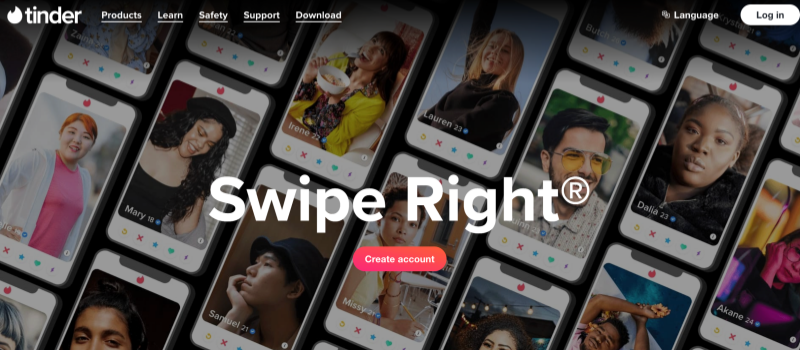
Tinder is a free dating app for users aged 18 and over, emphasizing safety features to help users date more safely; it is suitable for finding love, open relationships, dates, or chat friends, and can connect you with locals around the world to enhance the dating experience.
How to Use Tinder
To get started smoothly with Tinder and achieve a higher match rate, follow these steps:
- Download and Register an Account
Download Tinder from the App Store or Google Play. Login is supported via phone number, email, or third-party accounts. Registration requires basic information such as age, gender, and interest tags to help the system make accurate recommendations.
- Complete Your Profile
Your profile is key to improving your match rate.
Upload 3–6 clear and natural photos.
Write a short, personalized self-introduction.
Add interests, hobbies, or Spotify/Instagram connections. The more complete your profile, the easier it is to attract suitable matches.
- Set Location and Preferences
In “Explore Preferences,” set the age range, gender, and distance you want to match with. Tinder will recommend more suitable users based on this information.
- Start Swiping to Match
Swipe right to like, swipe left to skip. If both parties swipe right, you will be successfully matched and can start chatting.
- Interact using the chat function
Send messages after matching. Being polite, natural, and with a lighthearted sense of humor will encourage interaction.
- Utilize advanced features to improve efficiency
Tinder Plus, Gold, or Platinum offer more features, such as unlimited likes, seeing who likes you, and increased visibility, helping you find matches faster.
How Tinder Works
Show your personality on your profile page (answer prompts, introduce yourself, upload photos) to increase your chances of matching.
Use “Swipe Right” to like and “Swipe Left” to skip; a match is successful if the other person likes back (matching requires mutual interest).
PUT SAFETY FIRST
- Share My Date: Share your date plans with friends and family, letting them know your date and location.
- Get Photo Verified: Verify photo authenticity to increase your chances of matching.
- Are You Sure?/Does This Bother You: Detect inappropriate language and reduce disrespectful messages.
- Report a Profile: Quickly report/block accounts with suspicious behavior or inappropriate content.
- Block Contacts: Block people you don’t want to contact.
- Video Chat: Test your “dating chemistry” during online chats.
Tinder Core Function Analysis
1. Swipe-to-Match Mechanism
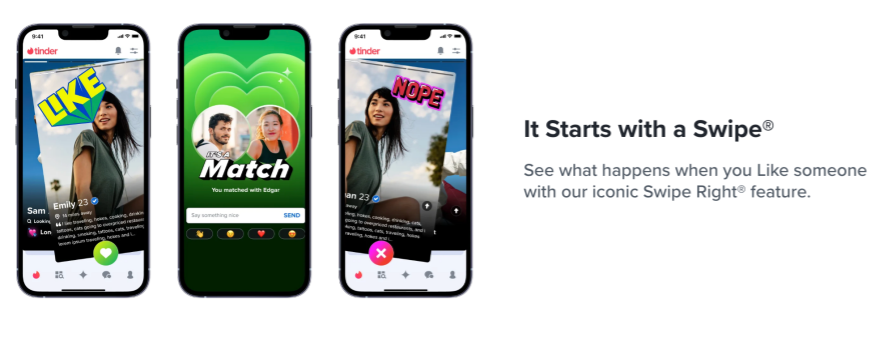
Tinder’s most representative feature is “swipe-to-match.” When browsing other users’ profiles, users can swipe right to indicate liking and swipe left to indicate disinterest. When both parties swipe right, the system creates a match, allowing them to start chatting. This intuitive and fast mechanism greatly simplifies the traditional dating process, allowing users to filter through a large number of potential matches in a short time. At the same time, the swipe gesture enhances user autonomy, making each choice entirely user-driven.
2. Profile and Interest Display
When registering for Tinder, users need to complete their profiles, including uploading photos, filling out a personal bio, and selecting interest tags. The completeness and authenticity of the profile settings significantly impact the match success rate. Tinder encourages users to upload clear personal photos and showcase their hobbies and lifestyles through interest tags, which not only enhances the attractiveness of the profile but also helps the system more accurately recommend potential matches
3. Instant Messaging Function

After a successful match, Tinder offers instant messaging, allowing users to communicate directly via text. The chat interface is simple and clear, supporting text, emojis, and even photos, making it easy for users to establish initial contact quickly. Instant messaging is an important part of the Tinder social experience, enabling interest matches to quickly translate into actual interaction and improving user satisfaction.
4. Premium Features and Paid Experiences
Tinder offers several paid services, such as Tinder Plus, Tinder Gold, and Tinder Platinum.
Tinder Plus Features

- Unlimited Likes: Develop feelings for any number of people.
- Passport Mode: Match/chat with locals around the world before arrival.
- Undo Rewinds: Cancel your last like/skip.
- Go Incognito: Only visible to those you like.
Tinder Gold Features
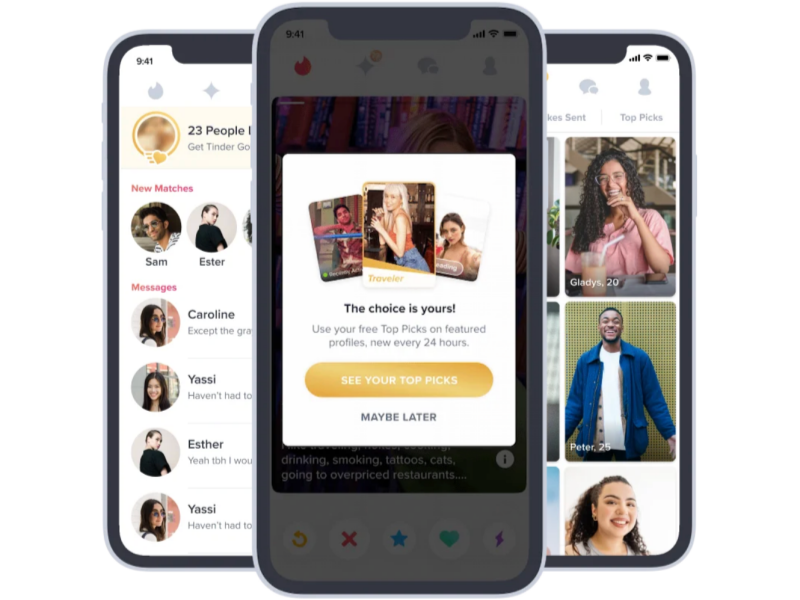
- Includes all Tinder Plus features; try it for a week before subscribing.
- See Who Likes You: Direct matching, faster connection.
- Monthly Boosts: Profile is pinned for 30 minutes to increase views.
- Weekly Super Likes: For people you really like.
Tinder Platinum Features
- Includes all Tinder’s premium features, allowing you to prioritize your likes in matches, send “Match Done” messages, etc.
For frequent Tinder users, utilizing these premium features effectively can significantly enhance the matching experience.
5. Global Matching Feature (Tinder Passport)
Tinder Passport is a paid feature that allows users to change their location and match with users around the world. For users who enjoy traveling, want cross-cultural exchange, or want to find friends in specific regions, this feature offers more social possibilities. Through Tinder Passport, users can not only meet local friends but also connect with people from all over the world, expanding their social circle and experiencing different ways of making friends in different cultural contexts.
Comparison of Mainstream Tinder Alternatives Platforms
The table below organizes different types of Tinder alternatives to help readers choose the appropriate application based on their needs.
|
Platform Name |
Core Features | Matching Method | Main Advantages |
Suitable Users |
| Women initiate conversations | Swipe left/right to match | Women control the chat pace, friendly atmosphere |
Users who want a more balanced social experience |
|
| Emphasizes serious relationships | Matches through “hint questions” | Rich profiles, more in-depth matching |
People looking for long-term relationships and serious friendships |
|
|
OkCupid |
Multi-dimensional personality questionnaire | The algorithm detects the match rate | More accurate matching, diverse questions |
Focuses on shared values and interests |
|
Coffee Meets Bage |
Curated daily recommendations | Limited matches are pushed daily | Improves quality, reduces selection fatigue |
Users who don’t want to be overwhelmed by a sea of swipes |
| Large global user base | Location + interest matching | Diverse user base, rich interactive features |
Want to meet users from different regions around the world |
|
|
Happn |
Based on location | Matches with people you pass by | Emphasizes real offline activity |
Want to meet users near your neighborhood |
|
Her |
Women/LGBTQ+ friendly | Community-based dating | Safe and friendly, rich activities |
Women and the LGBTQ+ community |
How to Choose the Most Suitable Tinder Alternatives?
When evaluating “Tinder alternatives,” consider the following:
1. Does the matching method suit your personal habits?
If you prefer Tinder’s left-swipe/right-swipe mechanism, Bumble and Hinge are relatively easier to use; if you prefer deeper matching, OkCupid or Hinge will provide more personality dimensions for reference.
2. What type of relationship do you want to build?
- Fast, easy social interaction: Badoo, Happn
- Serious, long-term relationships: Hinge, Coffee Meets Bagel, OkCupid
- Female-friendly environment: Bumble, Her
3. Security and privacy considerations
Different video chat 18 platforms have significantly different verification mechanisms. If you value account authenticity and want to reduce risk, choosing a platform with video verification or AI verification will provide greater peace of mind.
Social Security and Privacy Protection
User security and privacy protection are paramount in social applications. Tinder provides several measures in this regard. For example, users can report inappropriate behavior or have their accounts banned, and the platform will handle violations according to community guidelines. Simultaneously, Tinder encrypts and protects users’ personal information, ensuring the security of profiles and chat content on the platform.
In daily use, adhering to social etiquette is equally crucial. Tinder encourages users to maintain respect and sincerity, avoiding harassment, insults, or other inappropriate behavior. Through platform oversight and user self-discipline, Tinder strives to provide users with a safe, healthy, and positive video chat adult social environment.
Market Competitiveness and User Base
Tinder, as one of the world’s most popular video chat hot dating apps, boasts a massive user base, particularly in North America, Europe, and parts of Asia. Compared to other dating apps, Tinder’s advantages are mainly reflected in the following aspects:
- Simple and Intuitive Operation: The swipe-to-match mechanism lowers the social barrier.
- Global Coverage: The Passport feature allows users to match across regions, expanding their social reach.
- Rich Paid Features: Features like “Super Like” and unlimited swipes increase the success rate of matches.
Compared to competing apps like Bumble and Hinge, Tinder focuses more on quick matching and instant interaction, while other video cam chat platforms may emphasize precise matching or deep social interaction. Tinder maintains its leading position in the global mobile social networking market by continuously optimizing its functions and interface design.
Usage Tips and Optimization Suggestions
To achieve a better experience and matching results on Tinder, users can pay attention to the following:
- Complete Your Profile: Choose clear, authentic photos and fill in a detailed and attractive personal profile.
- Active Interaction: Chat promptly after matching to maintain initiative in communication.
- Use Paid Features Wisely: Choose Tinder Plus, Gold, or Platinum based on your needs to increase visibility and match efficiency.
- Comply with Platform Rules: Avoid violations and ensure account security.
- Pay Attention to Privacy and Security: Don’t easily share sensitive information; rationally assess the risks of meeting offline or further communication.
By using these tips, users can have a more efficient and comfortable social experience on Tinder while reducing potential risks.
Summary and Outlook
As a leading global mobile dating and social networking application, Tinder meets the diverse social needs of modern users through intuitive swipe matching, rich features, and global coverage. Whether it’s finding romantic relationships, expanding social circles, or facilitating cross-cultural communication, Tinder provides a convenient video chat 18+ platform. By optimizing profiles, using features appropriately, and adhering to community guidelines, users can fully experience the social fun Tinder offers.
FAQs
1. How can I get unbanned from Tinder?
If you got banned, check why first. Then, reach out to Tinder Support and politely appeal. Be honest and patient—don’t make a new account while waiting. Some bans are permanent, so follow the rules to stay safe next time!
2. How to pause a Tinder account?
You can pause your Tinder account by using Hide Mode (formerly called Pause Mode).
Steps:
- Open the Tinder app
- Go to Profile→ Settings
- Find “Hide from Tinder” or “Pause My Account”
- Toggle it ON
After enabling this, your profile won’t be shown to others, but you can still chat with existing matches.
3. How to delete a Tinder account?
Deleting your account permanently removes your profile, matches, messages, and data.
Steps:
- Open Tinder
- Tap Profile icon→ Settings
- Scroll to the bottom
- Tap Delete Account
- Choose Delete My Account(not “Pause”)
- Confirm again
Your account will be permanently removed.
4. How to change your name on Tinder?
You cannot directly change your name inside Tinder.
What you can do:
If you signed up with Facebook:
- Change your name on Facebook
- Wait for Tinder to sync OR log out and log back in
- Your Tinder name will update accordingly
If you signed up with a phone number or Google/Apple ID:
Tinder does not allow name changes.
The only workaround is:
- Delete your Tinder account
- Create a new one with the correct name
5. Can you send pictures on Tinder?
No, you cannot send photos or videos directly in Tinder chat.
What you can send:
- GIFs
- Stickers
- Spotify songs
- Your profile photos(by updating your profile)
Tinder blocks direct image sharing for safety and to prevent inappropriate content.