

What Is Tigo Live?
Tigo Live is a live video streaming and chat app that combines real-time broadcasting, instant messaging, and 1v1 video calls — plus social discovery features that connect you with users worldwide. Think of it as a mix between a live streaming platform and a random video chat app — you can watch broadcasters, join multiplayer rooms, or chat one-on-one with people worldwide. It’s available on both iOS and Android, with an APK download option for users outside official app store regions.
Tigo Live: Explore Live Video Chat
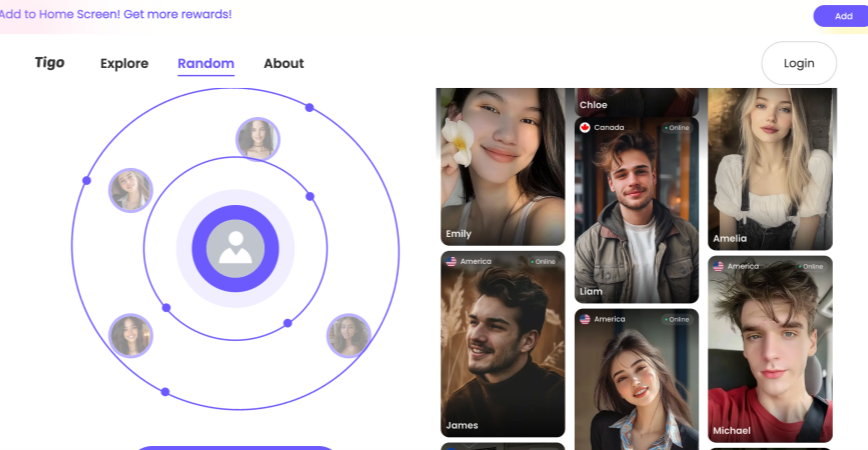
Tigo Live’s video chat is the core of the platform — and it’s where most users spend their time. Here’s what you’re getting.
- HD streaming with minimal lag. The platform supports 1080p video at 30 fps, which is solid for a free live chat app. In practice, quality depends on your connection and the other person’s, but under decent Wi-Fi the experience is smooth — no freezing, no robotic voice distortion, no frustrating delays between what you say and when they hear it.
- One-on-one and group rooms. You’re not limited to random 1v1 matching like on Omegle-style platforms. Tigo Live lets you join or create multiplayer rooms with up to 9 people on screen simultaneously. Some broadcasters use this for talk-show formats. Others use it as a hangout space. If you prefer private conversations, Tigo 1v1 video calls are always available — just tap on someone’s profile and ring them.
- Real-time subtitles across 60+ languages. This is the standout feature. When someone speaks in Hindi, Spanish, or Thai, live subtitles appear on your screen in your preferred language. It’s not perfect — slang trips it up, and fast talkers outrun the engine — but for casual cross-language conversations, it opens doors that most random chat platforms leave locked.
What’s missing? No gender filter on the free tier. No interest-based matching. You’re dropped into the pool and expected to swim. If you want curated connections, the VIP tier adds some filtering — but even that is limited compared to dedicated 1v1 matching platforms.
Tigo Live Chat: More Than Just Chat
Instant Messaging and Translation Assistant
In Tigo Live’s chat interface, text, voice, emojis, and short videos are synchronized in seconds. The system features a built-in real-time translation engine for over 60 languages. When you type Chinese in a Hindi room, the other party will instantly see the Hindi text, with a delay of less than 1 second. Voice messages also support instant transcription and translation, ensuring seamless cross-language communication.
Secure and Private Chat Environment
Tigo Live utilizes end-to-end encryption to ensure that third parties cannot intercept messages, voice, and video transmissions. AI scans for pornographic, abusive, and fraudulent keywords 24/7. Three violations will result in a permanent device ban. Users can enable “Incognito Mode” with a single click, hiding their online status and location.
📥 Ways to Obtain the Tigo Live APK
- Official App Store: For most users, downloading the Tigo Live APK from the official app store is the safest and most convenient way. Click Download and follow the system prompts to install Tigo Live on your phone easily. In the Apple App Store, similarly search for “Tigo Live” to find the corresponding app and download and install it.
- Official Website: In addition to app stores, you can also download the APK from the official Tigo Live website (www.tigo.chat).
⚙️ Notes During Installation
- Android: If you download the Tigo Live APK from sources other than the Google Play Store, before installing, you need to enable “Install apps from unknown sources” in your phone’s “Settings” – “Security & Privacy.”
- iOS: Downloading and installing Tigo Live from the App Store is relatively simple. During installation, you will also be prompted to request the permissions required by the app; simply authorize them as prompted.
Is Tigo Live Safe?
The answer comes down to how you use it. While Tigo video calls’ end-to-end encryption and 24/7 AI moderation give it an edge over completely unmoderated platforms, it’s still a live streaming app with strangers — and that comes with built-in risks.
To enjoy it without getting burned, seasoned users stay smart by managing three basic realities:
- 🔞 Unmoderated Public Rooms. Anyone can join a live room, and not everyone has good intentions. You’ll see real people, but bots, scammers, and users fishing for personal info are common in popular streams. If a stranger slides into your DMs with a link, it’s almost certainly a trap.
- 📸 The Recording Risk. As with any live cam space, someone on the other side can take a screenshot or screen record your video. The smart workaround? Stay anonymous. Don’t show your face or recognizable room details on camera until you’re completely comfortable with your match.
- 🛑 The APK Problem. Tigo Live offers an official APK download for Android users outside app store regions. But third-party APK sites often bundle modified versions with malware. Stick to the official website or Google Play — one wrong download and you’re not protecting your privacy, you’re handing it over.
If you’re about to jump into your first live room, here’s how to stay safe:
- 👀 Don’t turn your camera on right away. Lurk for a few minutes first — watch how the room runs, who’s talking, what the vibe is — before you show your face.
- 🤫 Give away NOTHING. No real name, no city, no Instagram handle, no “so, what do you do for work?” Stay a ghost until trust is earned — and on a live streaming app, that takes a while.
- 🛡️ Use a VPN. Tigo Live encrypts your chats, but your IP address still gives away your location. A VPN puts a wall between the platform and where you actually are.
- 🚩 Hit report the second something feels off. Long-press the profile, tap report, move on. Three strikes and that user gets a device ban — not just an account ban. It only works if you use it.
- 💻 Use a spare device. Don’t install APKs or hand camera/mic access to the phone you use for banking and work. A dedicated device — even an old phone on Wi-Fi — keeps your real life and your streaming life in separate lanes.
Best Tigo Live Alternatives for 1v1 Video Chat
If Tigo Live’s live-streaming-first approach isn’t your thing — or you just want pure 1v1 video chat without the broadcast noise — here are the best alternatives ranked by use case.
- Fachat — Best for Safe, Verified 1v1 Video Chat
If Tigo Live’s moderation gaps bother you, Fachat solves the core problem: real-person verification. Every profile is checked before it goes live, which dramatically cuts bots and fake accounts. Interest-based matching pairs you with people who share your language and preferences — no “drop you in the pool and hope you swim” approach. Browser-based, no APK hassle, no download. If you want Tigo’s 1v1 calls without Tigo’s trust issues, start here.
- Chamet — Best for 1v1 Video Calls with Girls
Chamet specializes in male-female 1v1 matching with a large female user base. Unlike Tigo Live’s mixed broadcast rooms, Chamet is built ground-up for private calls. Free coins on signup, daily check-in bonuses, and per-minute pricing for premium calls. Available on both iOS and Android.
- Bigo Live — Best If You Actually Want the Live Streaming Part
If Tigo’s live streaming side is what you’re after (not the 1v1 chat), Bigo Live is the bigger, more polished version. 400M+ users, gaming streams, creator monetization, virtual gifting — it’s the category leader for a reason. Just don’t expect strong 1v1 matching.
- CooMeet — Best for Verified Women, Paid
CooMeet’s pitch: men matched exclusively with verified women. No bots on the women’s side. The tradeoff is pricing — limited free trial, then subscription (~$9.99/month). If Tigo’s unmoderated rooms have burned you and you’re willing to pay for quality, this is the upgrade.
Tigo Live vs Fachat: Comparison At-A-Glance
| Feature | Fachat | Tigo Live |
| Core Focus | 1v1 video chat | live streaming + chat hybrid |
| Matching | Interest + language smart matching | Random pool — no interest matching |
| Verification | Verified users | Basic sign-up, no face verification |
| Pricing | Free basic trial; coins for extra features | Free tier + VIP + in-app purchases |
| Gender Filter | ✅ | 🟡 VIP only |
| Translation | ✅ Real-time | ✅ Subtitles across 60+ languages |
| Moderation | AI + human dual moderation | AI scanning 24/7 + device bans |
| Platform | Web + iOS/Android app | iOS + Android app (+ APK) |
Summary
Tigo Live occupies an interesting niche — it’s not quite a random chat roulette and not quite a pure live streaming app. It tries to do both, and the result is a platform that works well for a specific type of user but frustrates others.
✅ Try Tigo Live if:
- You want a mix of live streaming and random video chat
- Real-time translation matters for your conversations
- You’re comfortable with APK installation on Android
❌ Skip Tigo Live if:
- You want strong user verification or content moderation
- You prefer pure 1v1 chat without the live streaming noise
- You’re primarily on iOS and don’t want to deal with APK files
Tigo Live is a capable app for casual users who want variety — live rooms, 1v1 calls, translated chats — all in one place.
FAQs
1. What is Tigo Live used for?
Tigo Live is a live video streaming and chat app that combines real-time broadcasting with random 1v1 video calls. You can watch broadcasters, join multiplayer rooms with up to 9 people, chat via text or video, and meet users from around the world.
2. Is Tigo Live free?
Yes, the basic version is free. You can watch live streams, join public rooms, and start 1v1 video chats without paying. Optional in-app purchases and a VIP tier unlock extra features like priority matching, virtual gifts, and ad-free browsing.
3. How do I download Tigo Live APK safely?
Download the APK only from the official Tigo Live website (www.tigo.chat) or the Google Play Store. Avoid third-party APK sites — they often bundle modified versions with malware. Before installing on Android, enable “Install from unknown sources” temporarily, then disable it immediately after.
4. Does Tigo Live have real-time translation?
Yes. Tigo Live includes a built-in translation engine supporting over 60 languages. When someone types or speaks in another language, subtitles appear on your screen in real time. It’s not flawless — slang and fast speech can trip it up — but for casual cross-language chats, it works well.