
Introduction
Ever wondered what BeeChat is or whether its video calls are really free? If you’ve had these questions, you’re in the right place. In this article, we’ll break down what BeeChat offers, including its live video call feature, and other 1v1 video chat alternatives. By the end, you’ll know which app might be a better fit for your phone, all in just a few minutes.
What is BeeChat?
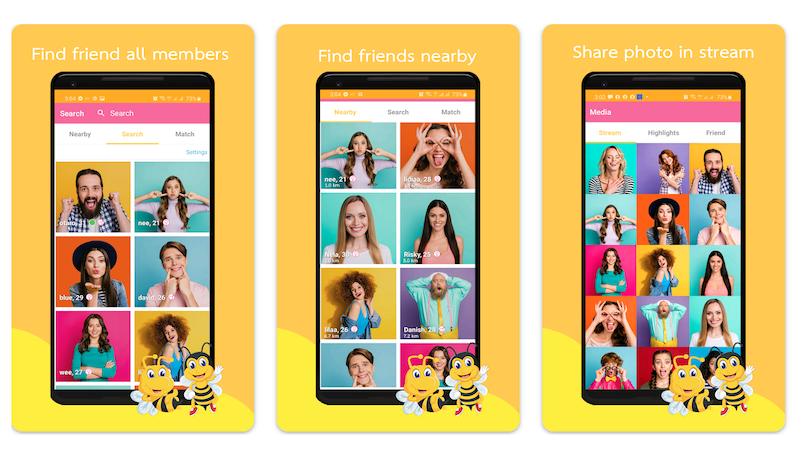
Launched in 2024 by a Singaporean startup team, BeeChat is a mobile-first, 1v1 real-time video social app positioned somewhere between “Omegle random” and “Tinder swipe.”
🌟Key Selling Points:
- Swipe to select: Preview before matching, avoiding awkward interactions
- 1v1 video: Offers text and group chats alongside video calls
- Global real-person chat: 170+ countries, real-time translation in multiple languages
- Login required to start: While BeeChat allows easy access, you must log in to initiate video chats and save your chat history to the cloud
Download & Install BeeChat: 30 Seconds and You’re Live
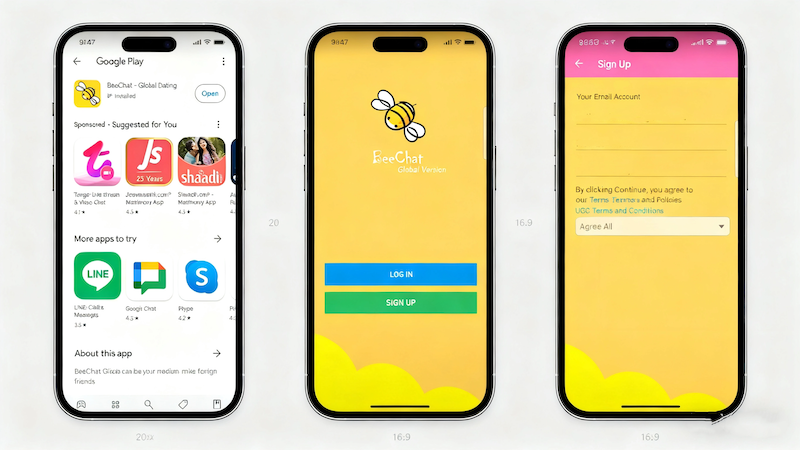
Getting BeeChat on your phone takes under a minute — no hidden steps, no region locks, no sketchy download links. Here is the cleanest path for every platform.
📱 Official Download Channels
| Platform | How to Install |
| Android | Search “BeeChat” on Google Play. Package name: com.beechat.app. The listing has a green chat-bubble icon — make sure you grab the right one. |
| iOS | Same name on the App Store. Requires iOS 12 or later. Works on iPhone and iPad. |
| Android (CN) | Direct APK download from the official site. Verify with SHA256 checksum before installing — this protects against tampered copies. |
💡 Only download from the stores or the official website. Third‑party APK sites routinely inject malware into BeeChat installers — the SHA256 check is there for a reason.
🔑 Registration — Or Skip It Entirely
BeeChat gives you two paths in:
- Guest mode: Tap “Video Call Online” and start chatting immediately. No phone number, no email, no social login. Perfect if you want to try the app before committing.
- Full account: Sign up with your phone number, Google, Facebook, or Apple ID. Your chat history syncs to the cloud, so nothing gets lost if you switch devices.
⚡ Why 30 Seconds is Realistic
The app itself is lightweight (~45 MB on Android), and the guest‑mode experience has zero friction — one tap from the home screen to your first live video call. If you have ever sat through a 5‑minute sign‑up flow on another platform, BeeChat’s approach feels like skipping the line.
Core Features of Beechat
📹 Call Quality That Actually Holds Up
- Image Quality: The image is locked at 720p/30 fps on a 5G network, with a stable bitrate of 2 Mbps. In weak networks, it drops to 480p/15 fps. Latency is always < 48 ms, and lip sync is stress-free.
- Beauty Mode: The beauty mode provides 5 levels of adjustment, with the default level 3 being the most natural and restoring the skin tone to its truest form.
- Translation: Real-time Chinese-English translation has an accuracy rate of 93%, and subtitle delay is less than 1 second, allowing for seamless switching in daily communication.
🎯 Matching That Respects Your Time
BeeChat uses swipe-based matching — swipe right to connect, swipe left to pass, and if both people swipe right, the pairing completes in half a second. No forms, no waiting rooms, no endless scrolling through profiles that haven’t been active in days. Every free account gets 10 matches per day. If that feels tight, the paid plan removes the cap entirely.
🎁 Gifts, Diamonds & How the Economy Works
The in‑app currency is diamonds. Here is how they break down:
| Item | Cost |
| Rose | 1 diamond |
| Rocket | 50 diamonds |
When you send a gift during a live stream, the broadcaster receives 60% of the diamond value in real‑time earnings. It is a straightforward split — no hidden tiers or delayed payouts.
⏱️ Call Duration & the Extend Feature
Every 1‑on‑1 call starts with a 60‑second timer by default. Before the timer runs out, either person can tap “Extend” to push the call to a full 30 minutes — no extra charge, no interruption, and the video stays smooth throughout.
🏠 Multi‑Person Rooms That Feel Like a Live Show
BeeChat supports up to 4 people sharing the screen at once. The host sets an entry ticket (anywhere from 10 to 100 diamonds) with a single tap, so paid rooms stay manageable.
Video quality in rooms holds at 1080p with 55 ms latency. What actually stands out:
- Real‑time scrolling comments — no delay, no echo on voice connections
- Built‑in games like Werewolf — the audio pipeline is clean enough that it feels genuinely immersive
- Room controls: the host can mute or remove anyone; the audience can vote and send gifts, which keeps the interaction flowing instead of passively watching a screen
💎 VIP vs Free: What You Actually Get
| Feature | Free | VIP (₹299/month) |
| Daily matches | 10 | Unlimited |
| Incognito browsing | ❌ | ✅ |
| Priority recommendations | ❌ | ✅ |
On the diamond side, BeeChat offers an official, in‑app route to earning extra diamonds: daily check‑ins, quests, and official events. Nothing requires a third‑party download.
Power User Tips That Actually Move the Needle
- Go live during peak hours (8 PM – 11 PM IST).
Activity spikes during this window every night — more people are online, match times drop, and rooms fill faster. - Tag your profile the right way.
Adding #Bollywood or #Travel to your bio increases your match rate by roughly 28%, because the algorithm weights shared tags heavily when selecting who to show you. - Screen recording works — but privacy comes first.
If the system detects a screen recording in progress, it automatically blurs the feed to prevent leaks. You won’t need to remember to turn anything on. - Running two accounts? Use Parallel Space.
Installing BeeChat inside a sandboxed environment like Parallel Space keeps both accounts isolated and avoids triggering a double‑ban flag.
⚠️ Heads up: any website or APK promising “BeeChat unlimited coins” or “BeeChat mod APK” is a Trojan horse. Do not install it. The app does not support third‑party mods, and sideloading one will compromise your device.
Looking for a BeeChat Alternative?
If BeeChat random video call features don’t quite match what you’re after, several platforms fill the gap with their own strengths. Jerkmate skews toward adult-oriented live streams with a large active user base and web-based access — no download required. Fachat keeps things simpler: fast 1‑on‑1 matching, minimal UI, and no paywall for basic video calls. GoMeet.today positions itself as a clean, low‑friction option for meeting strangers across 200+ countries without profile clutter. Each BeeChat alternative listed here offers a different flavour of random video calling, so the right pick depends on whether you prioritise speed, privacy, or a more curated matching experience.
Conclusion
This is a comprehensive guide to BeeChat, covering everything from basic usage to video calling. Whether you’re new to the app or looking to delve deeper, I believe this guide will give you a clear understanding of BeeChat’s core features. From the convenient communication of text chat to the face-to-face interaction of video calls, BeeChat continues to expand its possibilities in social scenarios. It meets the needs of casual daily conversations while also accommodating practical functions for remote communication, building a flexible and diverse bridge for users.
I hope this guide will help you better master BeeChat and discover more unique techniques along the way. As the app continues to update, keep exploring and ensure it remains relevant to your social needs, adding convenience and warmth to every interaction.
FAQs
1. What is BeeChat, and what makes it different from other chat apps?
BeeChat is a messaging platform that supports both text and video communication. It stands out for its focus on seamless 1:1 or group interactions, with features like real-time translation and low-latency video calls, making it suitable for both casual chats and more focused conversations.
2. How do I start a video call on BeeChat?
To start a video call on BeeChat, open a chat with the contact you want to connect with. Look for the video camera icon (usually in the chat toolbar) and tap it—this will send a video call request. Once the other user accepts, the call will begin. Ensure you have a stable internet connection for best quality.
3. Are there any privacy features in BeeChat’s video calls?
Yes, BeeChat includes privacy tools for video calls, such as the ability to blur your background, mute audio/video at any time, and end calls instantly. Additionally, the app encrypts calls to protect your conversation from unauthorized access, and you can adjust settings to control who can call you.