
Why Webcam Chat Safety Matters
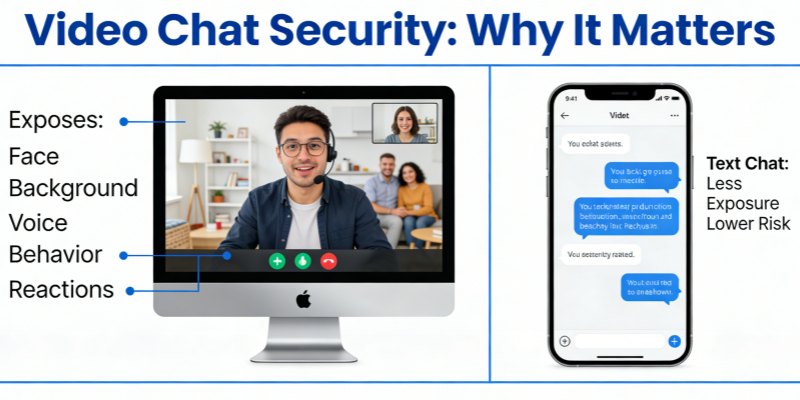
Unlike text-based chat, webcam interactions expose more:
- Your face 👤
- Your background 🏠
- Your voice 🎙
- Your behavior and reactions
This makes webcam chatting more engaging — but also more vulnerable.
Practicing smart online dating safety tips reduces the chances of scams, harassment, blackmail, and privacy breaches.
1️⃣ Protect Your Personal Information
Never share sensitive details during webcam chats, including:
- Full name
- Home address
- Phone number
- Workplace or school
- Financial information
Even if someone seems friendly, trust takes time. Scammers often build rapport before asking for personal details.
2️⃣ Be Mindful of Your Background 🏠
Your camera may reveal more than you think.
Before starting a webcam chat with strangers:
- Remove visible documents
- Hide personal photos
- Avoid showing house numbers or location clues
- Use a neutral background when possible
Small details can unintentionally expose private information.
3️⃣ Never Share Verification Codes 🔢
One of the most common scams involves someone asking for a code “sent to your phone.”
That code is often linked to your account security. Sharing it gives attackers access to your accounts.
A critical webcam chat online safety tip:
👉 Never share login codes with anyone.
4️⃣ Avoid Clicking Suspicious Links 🎣
Some users may send links in chat claiming they lead to:
- Private photos
- Social media profiles
- “Verification” pages
- Exclusive content
These links may contain malware or phishing traps.
If you’re unsure, don’t click.
5️⃣ Be Aware of Recording and Screenshot Risks 📸
You don’t control the other person’s device.
Assume that:
- Screenshots are possible
- Screen recordings are possible
- Content can be saved or shared
Avoid doing or showing anything you wouldn’t want publicly distributed.
6️⃣ Watch for Romance and Money Scams 💔💳
Common warning signs:
- Fast emotional attachment
- Claims of emergencies
- Requests for financial help
- Gift card or crypto payment requests
If someone you just met online asks for money, it’s almost always a scam.
7️⃣ Use Platform Safety Tools
Most webcam video chat platforms offer:
- Block features 🚫
- Report buttons ⚠
- Privacy settings 🔒
Use them. Don’t hesitate to exit a conversation that feels uncomfortable.
Your safety is more important than politeness.
8️⃣ Enable Two-Factor Authentication (2FA) 🔐
If the platform allows account creation, enable 2FA for added protection.
This ensures that even if your password is compromised, your account remains secure.
9️⃣ Avoid Oversharing on Social Media
Some webcam users may ask to continue chatting on Instagram, WhatsApp, or other apps.
Be cautious before moving conversations off-platform. Once someone has your social profile, they may gain access to:
- Your friends list
- Your photos
- Personal updates
Keep boundaries clear.
🔟 Trust Your Instincts
If something feels off, it probably is.
Red flags include:
- Pressure to act quickly
- Requests for secrecy
- Emotional manipulation
- Strange behavior on camera
Ending a chat early is always better than risking your safety.
Key Webcam Chat Safety Tips Online Summary 📌
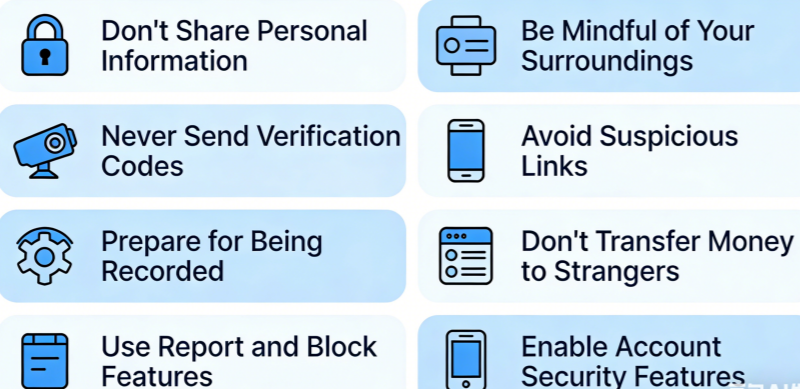
- ✔ Don’t share personal information
- ✔ Be mindful of your surroundings
- ✔ Never send verification codes
- ✔ Avoid suspicious links
- ✔ Expect possible recording
- ✔ Don’t send money to strangers
- ✔ Use reporting and blocking tools
- ✔ Enable account security features
Webcam Chat Platforms with Advanced Safety Features
Some webcam chat sites are generally considered safer than others because they provide stronger moderation, identity checks, built-in reporting, and privacy controls. Below are several notable options:
1. CooMeet
✅ Key safety features:
- Gender-verified profiles (often users registering as female are verified)
- Active moderation & reporting system
- Stronger user accountability
🔒 Good choice if you want more structured user screening and fewer random unknowns.
2. OmeTV
✅ Safety highlights:
- Real-time moderation filters
- Block/report tools for inappropriate users
- Country/region filters (optional)
🔒 Not perfect, but better than unmoderated random chat sites.
3. ChatHub
✅ Safety features:
- Built-in profanity and content filters
- Option to filter matches by language/interests
- Easy block/report buttons
🔒 Provides slightly more control than bare-bones video chat platforms.
4. Meetgle
✅ Advantages:
- Browser-based, no app permissions required
- Quick skip/report options
- Works without an account, lowering the risk of stored personal data
🔒 Best for people who want fast, simple chat with basic safety controls.
5. Tinychat
✅ Safety aspects:
- Room moderation tools
- Ability to kick/block bad actors
- Text + video + voice options help avoid oversharing
🔒 Not a random-roulette site, but moderated group spaces can feel safer.
6. Camfrog
✅ Moderation benefits:
- Community moderators
- User roles (moderator/owner) manage behavior
- Private and public room safety settings
🔒 Works well for established communities rather than random matches.
7. HelloTalk or Tandem (language exchange)
While not classic webcam roulette platforms, these apps let you video call language partners and emphasize safety features like verified profiles and reporting.
🔒 Better if your goal is a safe interpersonal connection with shared purposes.
Safety Notes for Any Platform
Even safer platforms are not inherently risk-free. Always follow core online adult webcam chat tips for online safety and security:
- ✔ Avoid sharing personal info
- ✔ Use built-in block/report tools
- ✔ Stop chats that make you uneasy
- ✔ Never send sensitive codes or money
📌 Summary Recommendation:
- 📍 Highest structured security: CooMeet, OmeTV
- 👥 Better moderation controls: ChatHub, Tinychat, Camfrog
- 🌐 Quick & simple with basic privacy: Meetgle
- 📚 Safer purpose-driven chats: HelloTalk/Tandem
Final Thoughts 🌐
Online webcam chatting can be fun, social, and even meaningful. But like any digital interaction, it requires awareness.
Following these random webcam chat safety tips for online dating helps you stay in control of your privacy and reduces the risk of scams or exploitation.
Stay smart. Stay alert. And enjoy connecting safely.
FAQs
- Can someone record me during a webcam chat?
Yes. The other person can potentially take screenshots or record their screen without your knowledge. Always assume that anything shown on camera could be saved or shared.
- Is it safe to move webcam chat to social media?
Be cautious. Moving conversations to social media can expose your personal profile, photos, and contacts. Only connect on other platforms if you fully trust the person.
- What should I do if I feel uncomfortable during an anonymous webcam chat?
Immediately end the chat, block the user, and report them through the platform’s safety tools. Your safety is more important than continuing a conversation.
- Are there webcam random chat platforms with better safety features?
Some platforms offer stronger moderation tools, identity verification systems, and reporting options. Before joining, review the platform’s privacy policies and safety measures.